
首页 > 基础资料 博客日记
用300行代码手写SpringBoot核心原理
2026-04-08 09:30:01基础资料围观1次
本文将带你深入了解SpringBoot框架的核心原理,通过300行代码的迷你版本来展示SpringBoot核心注解的作用及特性,在学习本篇文章时,可以同时学习:深度揭秘SpringBoot自动装配的实现原理,相信大家会对本文中的各个功能会有更加深刻的理解
本文内容:
- 手写模拟SpringBoot启动过程
- 手写模拟SpringBoot条件注解功能
- 手写模拟SpringBoot自动配置功能
- SpringBoot整合Tomcat底层源码分析
- spring.factories文件解析源码分析
- SpringBoot自动配置类加载过程源码分析
依赖
因为我们模拟实现的是SpringBoot,而不是SpringMVC,所以我直接在user包下定义了UserController和UserService,最终我们希望能运行MyApplication中的main方法,就直接启动了项目,并能在浏览器中正常的访问到UserController中的某个方法。
首先,SpringBoot是基于的Spring,所以我们要依赖Spring,然后我希望我们模拟出来的SpringBoot也支持Spring MVC的那一套功能,所以也要依赖Spring MVC,包括Tomcat等,所以在SpringBoot模块中要添加以下依赖:
<dependencies>
    <dependency>
	    <groupId>org.springframework</groupId>
        <artifactId>spring-context</artifactId>
        <version>5.3.18</version>
    </dependency>
    <dependency>
	    <groupId>org.springframework</groupId>
        <artifactId>spring-web</artifactId>
        <version>5.3.18</version>
    </dependency>
    <dependency>
	    <groupId>org.springframework</groupId>
        <artifactId>spring-webmvc</artifactId>
        <version>5.3.18</version>
    </dependency>
    <dependency>
	    <groupId>javax.servlet</groupId>
        <artifactId>javax.servlet-api</artifactId>
        <version>4.0.1</version>
    </dependency>
    <dependency>
	    <groupId>org.apache.tomcat.embed</groupId>
        <artifactId>tomcat-embed-core</artifactId>
        <version>9.0.60</version>
    </dependency>
</dependencies>
在User模块下我们进行正常的开发就行了,比如先添加SpringBoot依赖:
<dependencies>
    <dependency>
	    <groupId>com.seven</groupId>
        <artifactId>springboot</artifactId>
        <version>1.0-SNAPSHOT</version>
    </dependency>
</dependencies>
然后定义相关的Controller和Service:
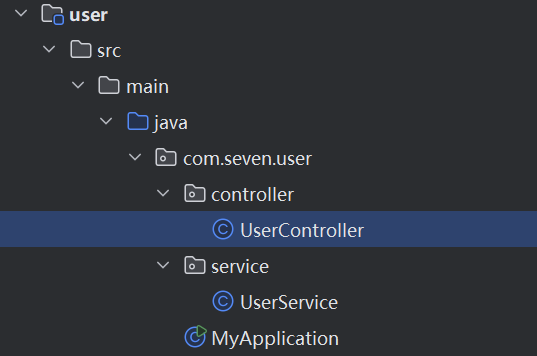
@RestController
public class UserController {

    @Autowired
    private UserService userService;

    @GetMapping("test")
    public String test(){
        return userService.test();
    }
}
核心注解和核心类
我们在真正使用SpringBoot时,核心会用到SpringBoot一个类和注解:
- @SpringBootApplication,这个注解是加在应用启动类上的,也就是main方法所在的类
- SpringApplication,这个类中有个run()方法,用来启动SpringBoot应用的
所以我们也来模拟实现他们。
一个@SevenSpringBootApplication注解:
@Target(ElementType.TYPE)
@Retention(RetentionPolicy.RUNTIME)
@Configuration
@ComponentScan
public @interface SevenSpringBootApplication {
}
一个用来实现启动逻辑的SevenSpringApplication类
public class SevenSpringApplication {

    public static void run(Class clazz){

    }
}
注意run方法需要接收一个Class类型的参数,这个class是用来干嘛的,等会就知道了。
有了以上两者,我们就可以在User的MyApplication中来使用了,比如:
@SevenSpringBootApplication
public class MyApplication { // spring.factories

    public static void main(String[] args) {
        SevenSpringApplication.run(MyApplication.class);
    }
}
现在用来是有模有样了,但中看不中用,所以我们要来好好实现以下run方法中的逻辑了。
run方法
run方法中需要实现什么具体的逻辑呢?
首先,我们希望run方法一旦执行完,我们就能在浏览器中访问到UserController,那势必在run方法中要启动Tomcat,通过Tomcat就能接收到请求了。
大家如果学过Spring MVC的底层原理就会知道,在SpringMVC中有一个Servlet非常核心,那就是DispatcherServlet,这个DispatcherServlet需要绑定一个Spring容器,因为DispatcherServlet接收到请求后,就会从所绑定的Spring容器中找到所匹配的Controller,并执行所匹配的方法。
所以,在run方法中,我们要实现的逻辑如下:
- 创建一个Spring容器
- 创建Tomcat对象
- 生成DispatcherServlet对象,并且和前面创建出来的Spring容器进行绑定
- 将DispatcherServlet添加到Tomcat中
- 启动Tomcat
创建一个容器
这个步骤比较简单,代码如下:
public class SevenSpringApplication {

    public static void run(Class clazz){

        // Spring容器
        AnnotationConfigWebApplicationContext applicationContext = new AnnotationConfigWebApplicationContext();
        applicationContext.register(clazz);
        applicationContext.refresh();

    }
我们创建的是一个AnnotationConfigWebApplicationContext容器,并且把run方法传入进来的class作为容器的配置类,比如在MyApplication的run方法中,我们就是把MyApplication.class传入到了run方法中,最终MyApplication就是所创建出来的Spring容器的配置类,并且由于MyApplication类上有@SevenSpringBootApplication注解,而@SevenSpringBootApplication注解的定义上又存在@ComponentScan注解,所以AnnotationConfigWebApplicationContext容器在执行refresh时,就会解析MyApplication这个配置类,从而发现定义了@ComponentScan注解,也就知道了要进行扫描,只不过扫描路径为空,而AnnotationConfigWebApplicationContext容器会处理这种情况,如果扫描路径会空,则会将MyApplication所在的包路径做为扫描路径,从而就会扫描到UserService和UserController。
所以Spring容器创建完之后,容器内部就拥有了UserService和UserController这两个Bean。
启动Tomcat
我们用的是Embed-Tomcat,也就是内嵌的Tomcat,真正的SpringBoot中也用的是内嵌的Tomcat,而对于启动内嵌的Tomcat,也并不麻烦,代码如下:
public static void startTomcat(WebApplicationContext applicationContext){

	Tomcat tomcat = new Tomcat();
	Server server = tomcat.getServer();
	Service service = server.findService("Tomcat");
	Connector connector = new Connector();
	connector.setPort(8081);
	Engine engine = new StandardEngine();
	engine.setDefaultHost("localhost");
	Host host = new StandardHost();
	host.setName("localhost");
	String contextPath = "";
	Context context = new StandardContext();
	context.setPath(contextPath);
	context.addLifecycleListener(new Tomcat.FixContextListener());
	host.addChild(context);
	engine.addChild(host);
	service.setContainer(engine);
	service.addConnector(connector);
	tomcat.addServlet(contextPath, "dispatcher", new DispatcherServlet(applicationContext));
	context.addServletMappingDecoded("/*", "dispatcher");

	try {
		tomcat.start();
	} catch (LifecycleException e) {
		e.printStackTrace();
	}

}
代码虽然看上去比较多,但是逻辑并不复杂,比如配置了Tomcat绑定的端口为8081,后面向当前Tomcat中添加了DispatcherServlet,并设置了一个Mapping关系,最后启动,其他代码则不用太过关心。
而且在构造DispatcherServlet对象时,传入了一个ApplicationContext对象,也就是一个Spring容器,就是我们前文说的,DispatcherServlet对象和一个Spring容器进行绑定。
接下来,我们只需要在run方法中,调用startTomcat即可:
public static void run(Class clazz){

    // Spring容器
    AnnotationConfigWebApplicationContext applicationContext = new AnnotationConfigWebApplicationContext();
    applicationContext.register(clazz);
    applicationContext.refresh();

    startTomcat(applicationContext);

}
实际上代码写到这,一个极度精简版的SpringBoot就写出来了,比如现在运行MyApplication,就能正常的启动项目,并能接收请求。
此时,你可以继续去写其他的Controller和Service了,照样能正常访问到,而我们的业务代码中仍然只用到了SevenSpringApplication类和@SevenSpringBootApplication注解。
实现Tomcat和Jetty的切换
虽然我们前面已经实现了一个比较简单的SpringBoot,不过我们可以继续来扩充它的功能,比如现在我有这么一个需求,这个需求就是我现在不想使用Tomcat了,而是想要用Jetty,那该怎么办?
我们前面代码中默认启动的是Tomcat,那我现在想改成这样子:
- 如果项目中有Tomcat的依赖,那就启动Tomcat
- 如果项目中有Jetty的依赖就启动Jetty
- 如果两者都没有则报错
- 如果两者都有也报错
这个逻辑希望SpringBoot自动帮我实现,对于程序员用户而言,只要在Pom文件中添加相关依赖就可以了,想用Tomcat就加Tomcat依赖,想用Jetty就加Jetty依赖。
那SpringBoot该如何实现呢?
我们知道,不管是Tomcat还是Jetty,它们都是应用服务器,或者是Servlet容器,所以我们可以定义接口来表示它们,这个接口叫做WebServer(别问我为什么叫这个,因为真正的SpringBoot源码中也叫这个)。
并且在这个接口中定义一个start方法:
public interface WebServer {

    public void start();
}
有了WebServer接口之后,就针对Tomcat和Jetty提供两个实现类:
public class TomcatWebServer implements WebServer{
    @Override
    public void start() {
        System.out.println("启动Tomcat");
    }
}

public class JettyWebServer implements WebServer{
    @Override
    public void start() {
        System.out.println("启动Jetty");
    }
}
而在SevenSpringApplication中的run方法中,我们就要去获取对应的WebServer,然后启动对应的webServer,代码为:
public class SevenSpringApplication {

    public static void run(Class clazz){

        // Spring容器
        AnnotationConfigWebApplicationContext applicationContext = new AnnotationConfigWebApplicationContext();
        applicationContext.register(clazz);
        applicationContext.refresh();

        WebServer webServer = getWebServer(applicationContext);
        webServer.start();

    }

    public static WebServer getWebServer(WebApplicationContext applicationContext){
	    return null;
	}
}
这样,我们就只需要在getWebServer方法中去判断到底该返回TomcatWebServer还是JettyWebServer。
前面提到过,我们希望根据项目中的依赖情况,来决定到底用哪个WebServer,我就直接用SpringBoot中的源码实现方式来模拟了。
模拟实现条件注解
首先我们得实现一个条件注解@SevenConditionalOnClass,对应代码如下:
@Target({ ElementType.TYPE, ElementType.METHOD })
@Retention(RetentionPolicy.RUNTIME)
@Conditional(SevenCondition.class)
public @interface SevenConditionalOnClass {

    String value();
}
注意核心为@Conditional(SevenCondition.class)中的SevenCondition,因为它才是真正得条件逻辑:
public class SevenCondition implements Condition {
    @Override
    public boolean matches(ConditionContext context, AnnotatedTypeMetadata metadata) {

        Map<String, Object> annotationAttributes = metadata.getAnnotationAttributes(SevenConditionalOnClass.class.getName());
        String className = (String) annotationAttributes.get("value");

        try {
            context.getClassLoader().loadClass(className);
            return true;
        } catch (ClassNotFoundException e) {
           return false;
        }

    }
}
具体逻辑为,拿到@SevenConditionalOnClass中的value属性,然后用类加载器进行加载,如果加载到了所指定的这个类,那就表示符合条件,如果加载不到,则表示不符合条件。
模拟实现自动配置类
有了条件注解,我们就可以来使用它了,那如何实现呢?
这里就要用到自动配置类的概念,我们先看代码:
@Configuration
public class WebServerAutoConfiguration {

    @Bean
    @SevenConditionalOnClass("org.apache.catalina.startup.Tomcat")
    public TomcatWebServer tomcatWebServer(){
        return new TomcatWebServer();
    }

    @Bean
    @SevenConditionalOnClass("org.eclipse.jetty.server.Server")
    public JettyWebServer jettyWebServer(){
        return new JettyWebServer();
    }
}
这个代码还是比较简单的,通过一个WebServiceAutoConfiguration的Spring配置类,在里面定义了两个Bean,一个TomcatWebServer,一个JettyWebServer,不过这两个要生效的前提是符合当前所指定的条件,比如:
- 只有存在"org.apache.catalina.startup.Tomcat"类,那么才有TomcatWebServer这个Bean
- 只有存在"org.eclipse.jetty.server.Server"类,那么才有TomcatWebServer这个Bean
并且我们只需要在SevenSpringApplication中getWebServer方法,如此实现:
public static WebServer getWebServer(WebApplicationContext applicationContext){
    Map<String, WebServer> beansOfType = applicationContext.getBeansOfType(WebServer.class);

    if (beansOfType.isEmpty()) {
        throw new NullPointerException();
    }

    if (beansOfType.size() > 1) {
        throw new IllegalStateException();
    }

    return beansOfType.values().stream().findFirst().get();
}
这样整体SpringBoot启动逻辑就是这样的:
- 创建一个AnnotationConfigWebApplicationContext容器
- 解析MyApplication类,然后进行扫描
- 通过getWebServer方法从Spring容器中获取WebServer类型的Bean
- 调用WebServer对象的start方法
有了以上步骤,我们还差了一个关键步骤,就是Spring要能解析到WebServiceAutoConfiguration这个自动配置类,因为不管这个类里写了什么代码,Spring不去解析它,那都是没用的,此时我们需要SpringBoot在run方法中,能找到WebServiceAutoConfiguration这个配置类并添加到Spring容器中。
MyApplication是Spring的一个配置类,但是MyApplication是我们传递给SpringBoot,从而添加到Spring容器中去的,而WebServiceAutoConfiguration就需要SpringBoot去自动发现,而不需要程序员做任何配置才能把它添加到Spring容器中去,而且要注意的是,Spring容器扫描也是扫描不到WebServiceAutoConfiguration这个类的,因为我们的扫描路径是"com.seven.user",而WebServiceAutoConfiguration所在的包路径为"com.seven.springboot"。
那SpringBoot中是如何实现的呢?通过SPI,当然SpringBoot中自己实现了一套SPI机制,也就是我们熟知的spring.factories文件,那么我们模拟就不搞复杂了,就直接用JDK自带的SPI机制。
发现自动配置类
为了实现这个功能,以及为了最后的效果演示,我们需要把springboot源码和业务代码源码拆分两个maven模块,也就相当于两个项目,最后的源码结构为:
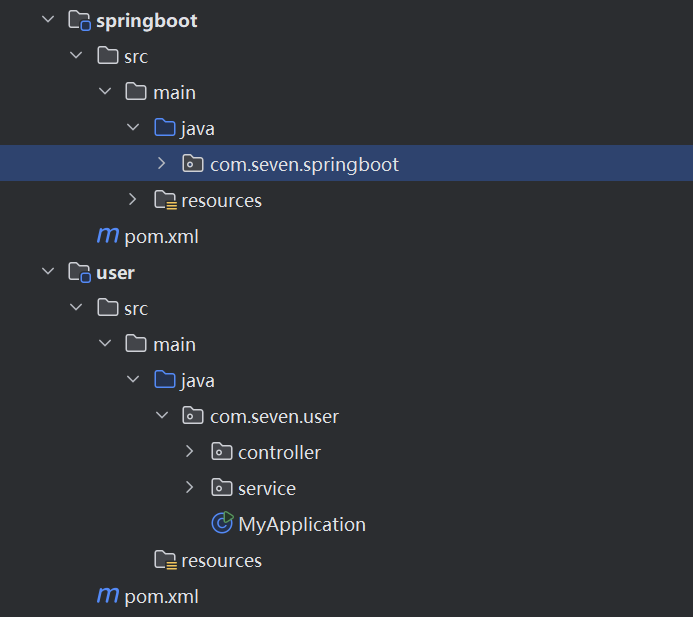
现在我们只需要在springboot项目中的resources目录下添加如下目录(META-INF/services)和文件:

SPI的配置就完成了,相当于通过com.seven.springboot.AutoConfiguration文件配置了springboot中所提供的配置类。
并且提供一个接口:
public interface AutoConfiguration {
}
并且WebServiceAutoConfiguration实现该接口:
@Configuration
public class WebServerAutoConfiguration implements AutoConfiguration {

    @Bean
    @SevenConditionalOnClass("org.apache.catalina.startup.Tomcat")
    public TomcatWebServer tomcatWebServer(){
        return new TomcatWebServer();
    }

    @Bean
    @SevenConditionalOnClass("org.eclipse.jetty.server.Server")
    public JettyWebServer jettyWebServer(){
        return new JettyWebServer();
    }
}
然后我们再利用spring中的@Import技术来导入这些配置类,我们在@SevenSpringBootApplication的定义上增加如下代码:
@Target(ElementType.TYPE)
@Retention(RetentionPolicy.RUNTIME)
@Configuration
@ComponentScan
@Import(SevenImportSeclet.class)
public @interface SevenSpringBootApplication {
}
SevenImportSeclet类为:
public class SevenImportSeclet implements DeferredImportSelector {

    @Override
    public String[] selectImports(AnnotationMetadata importingClassMetadata) {

        // 自动配置

        ServiceLoader<AutoConfiguration> loader = ServiceLoader.load(AutoConfiguration.class);

        List<String> list = new ArrayList<>();

        for (AutoConfiguration configuration : loader) {
            list.add(configuration.getClass().getName());
        }

        return list.toArray(new String[0]);
    }
}
这就完成了从com.seven.springboot.AutoConfiguration文件中获取自动配置类的名字,并导入到Spring容器中,从而Spring容器就知道了这些配置类的存在,而对于user项目而言,是不需要修改代码的。
此时运行MyApplication,就能看到启动了Tomcat
总结
到此,我们实现了一个简单版本的SpringBoot,因为SpringBoot首先是基于Spring的,提供的功能也更加强大
本文来自互联网用户投稿,该文观点仅代表作者本人,不代表本站立场。本站仅提供信息存储空间服务,不拥有所有权,不承担相关法律责任。如若内容造成侵权/违法违规/事实不符,请联系邮箱:jacktools123@163.com进行投诉反馈,一经查实,立即删除!
标签:
相关文章
最新发布
- 企业微信服务商争源数字科技谈中小企业如何用好数字化工具
- 【生产避坑】Flink CDC + SQL Server 无增量?5分钟定位,直接抄解决方案
- Python网络请求库,从 requests 到 httpx
- 使用 Python 将 Excel 数据批量导入到数据库中(SQLite)
- 我花了一上午,帮一个 AI 找到了自己的"亲生父母"
- PostgreSQL 数据误删 止损操作
- 推荐3款必备“测试神器”Skill:用例生成、根因分析一键搞定
- 用300行代码手写SpringBoot核心原理
- .NET 高级开发 | i18n 原理、实现一个 i18n 框架
- MAF快速入门(22)声明式Agent实战
点击排行
本站推荐