
首页 > 基础资料 博客日记
使用 UEFI 图形输出协议 GOP 在屏幕上显示图像的方法
2026-04-10 18:30:03基础资料围观1次
上一节中我们介绍了如何在 UEFI 应用程序中调用特定的 Protocol。本节的任务是利用 UEFI 中的图形输出协议 Gop 在屏幕上输出一个特定图形。下面是我们本次的工程目录。
MyPkg
├── Application
│   └── GopDrawApp
│       ├── GopDrawApp.c
│       └── GopDrawApp.inf
├── MyPkg.dec
└── MyPkg.dsc
什么是图形输出协议(GOP)
GOP(Graphics Output Protocol,图形输出协议) 是 UEFI 规范中的一个核心接口,用来在操作系统启动前接管显卡并显示图形界面。接下来我们分两部分来介绍,首先用最简单的语言来说明 GOP 控制显示的原理,然后分析一下 UEFI 中 GOP 的源码定义。
我们在屏幕上看到的一幅完整图片是由有限的特定像素点组成的,比如常见的 1920*1080 分辨率。每个像素点通过红绿蓝三原色的不同强弱组合便能够显示特定的色彩。显存中有一块专门用于存储当前画面像素颜色信息的区域,称为 FrameBuffer(帧缓冲区)。屏幕显示控制器会不断从 FrameBuffer 中读取数据,并将其转换为屏幕上的图像。GOP 的作用就是为操作系统启动前的软件(如 BootLoader、UEFI 应用)提供访问 FrameBuffer 的标准接口。通过 GOP,我们可以获取 FrameBuffer 的地址、分辨率、像素格式,并直接向其中写入数据,从而在屏幕上显示想要的图像。
以下是 GOP 在 UEFI 中的 Protocol 定义。
struct _EFI_GRAPHICS_OUTPUT_PROTOCOL {
  EFI_GRAPHICS_OUTPUT_PROTOCOL_QUERY_MODE    QueryMode;
  EFI_GRAPHICS_OUTPUT_PROTOCOL_SET_MODE      SetMode;
  EFI_GRAPHICS_OUTPUT_PROTOCOL_BLT           Blt;
  EFI_GRAPHICS_OUTPUT_PROTOCOL_MODE          *Mode;
};
-
QueryMode— 查询模式。用于枚举显卡所支持的所有显示模式。在设置分辨率之前,你需要先调用它来查询有哪些模式可用。你需要传入一个ModeNumber(从 0 开始),它会返回该模式对应的具体信息(分辨率、刷新率等)。 -
SetMode— 设置模式。将显示设备切换到你指定的某个模式。调用成功后,帧缓冲区的分辨率、像素格式等会随之改变。你需要传入一个ModeNumber,这个编号必须是通过QueryMode查询得到的有效编号。 -
Blt— 像素块传输。这是一个高效的图形绘制函数。它可以在帧缓冲区内部、或是在帧缓冲区和内存缓冲区之间,复制、填充或转换矩形像素块。 -
Mode— 当前模式信息。这是一个只读的状态信息。它包含了当前显示模式的具体参数,方便你随时查询。-
MaxMode:QueryMode 支持的最大模式数量。
-
Mode:当前激活的模式编号。
-
Info:指向 EFI_GRAPHICS_OUTPUT_MODE_INFORMATION 的指针,包含当前模式的详细信息(分辨率、像素格式等)。
-
SizeOfInfo:上述 Info 结构体的大小。
-
FrameBufferBase:帧缓冲区的基地址(显存中的物理地址)。你向屏幕写入数据,就是向这个地址开始的内存写入。
-
FrameBufferSize:帧缓冲区的大小(字节)。
-
一个典型的 GOP 使用流程如下:
- 枚举:调用
Gop->QueryMode()获取所有支持的分辨率。 - 设置:调用
Gop->SetMode()切换到你需要的分辨率(比如 1920x1080)。 - 获取信息:访问
Gop->Mode->FrameBufferBase和Gop->Mode->Info->PixelFormat,知道往哪里写数据,以及以什么格式写。 - 绘制:向
FrameBufferBase写入像素数据,或调用Gop->Blt()来高效绘制图形。
源码示例
此代码大致逻辑如下:
首先需要获取 GOP 的 Protocol 指针。随后即可使用 GOP 的功能。使用Gop->Mode->MaxMode获取显卡支持的显示格式数量,然后调用 Gop->QueryMode()枚举这些格式信息。调用Gop->SetMode()设置其中一个格式。最后通过写入 FrameBuffer 来显示一幅图像示例。
GopDrawApp.c 源码如下:
#include <Uefi.h>
#include <Library/UefiLib.h>
#include <Library/UefiApplicationEntryPoint.h>
#include <Library/UefiBootServicesTableLib.h>
#include <Protocol/GraphicsOutput.h>

#define DRAW

EFI_STATUS
EFIAPI
UefiMain (
  IN EFI_HANDLE        ImageHandle,
  IN EFI_SYSTEM_TABLE  *SystemTable
  )
{
    EFI_STATUS                      Status;
    EFI_GRAPHICS_OUTPUT_PROTOCOL    *Gop;
    UINT32                          MaxMode;
    UINT32                          ModeNumber;
    UINTN                           SizeOfInfo;
    UINT32                          SelectedMode = 0;
    UINT32                          Horizontal = 0;
    UINT32                          Vertical = 0;
    UINTN                           Index;
    EFI_GRAPHICS_OUTPUT_MODE_INFORMATION *ModeInfo = NULL;

    // 1. 获取 GOP Protocol
    Status = gBS->LocateProtocol(
                    &gEfiGraphicsOutputProtocolGuid,
                    NULL,
                    (VOID**)&Gop
                    );

    if (EFI_ERROR(Status)) {
        Print(L"Failed to locate GOP\n");
        return Status;
    }
    Print(L"GOP protocol found successfully!\n");


    // 2. 枚举所有显示模式
    Print(L"=== Enumerating All Display Modes ===\n");
    Print(L"MaxMode = %d\n\n", Gop->Mode->MaxMode);     // 支持的显示模式个数
    MaxMode = Gop->Mode->MaxMode;

    for (ModeNumber = 0; ModeNumber < MaxMode; ModeNumber++) {
        Status = Gop->QueryMode(Gop, ModeNumber, &SizeOfInfo, &ModeInfo);
        if (EFI_ERROR(Status)) {
            Print(L"QueryMode failed for mode %d: %r\n", ModeNumber, Status);
            continue;
        }

        Print(L"Mode %2d: %4d x %4d, PixelFormat = %d\n",
            ModeNumber,
            ModeInfo->HorizontalResolution,
            ModeInfo->VerticalResolution,
            ModeInfo->PixelFormat
        );

        // 注意:ModeInfo 是由 GOP 内部分配的内存,不需要我们手动释放
    }

    // 3. 设置显示模式
    Status = Gop->SetMode(Gop, SelectedMode);
    if (EFI_ERROR(Status)) {
        Print(L"Failed to set mode %d: %r\n", SelectedMode, Status);
        return Status;
    }
    Horizontal = Gop->Mode->Info->HorizontalResolution;
    Vertical = Gop->Mode->Info->VerticalResolution;
    Print(L"Selected mode %d with resolution %d x %d\n", SelectedMode, Horizontal, Vertical);
    Print(L"Mode %d set successfully!\n", SelectedMode);

    // 3. 当前显示模式信息
    Print(L"\n=== Current Mode Information ===\n");
    Print(L"Current Mode Number: %d\n", Gop->Mode->Mode);
    Print(L"FrameBuffer Base:   0x%016lx\n", Gop->Mode->FrameBufferBase);
    Print(L"FrameBuffer Size:   %d bytes (%.2f MB)\n",
            Gop->Mode->FrameBufferSize,
            (double)Gop->Mode->FrameBufferSize / (1024 * 1024));
    Print(L"Horizontal Resolution: %d\n", Gop->Mode->Info->HorizontalResolution);
    Print(L"Vertical Resolution:   %d\n", Gop->Mode->Info->VerticalResolution);
    Print(L"Pixel Format:          %d\n", Gop->Mode->Info->PixelFormat);

    // 解释像素格式
    switch (Gop->Mode->Info->PixelFormat) {
        case PixelRedGreenBlueReserved8BitPerColor:
            Print(L"  -> Pixel Format: RGB (8:8:8, with reserved byte)\n");
            break;
        case PixelBlueGreenRedReserved8BitPerColor:
            Print(L"  -> Pixel Format: BGR (most common on PC)\n");
            break;
        case PixelBitMask:
            Print(L"  -> Pixel Format: Custom bitmask\n");
            break;
        case PixelBltOnly:
            Print(L"  -> Pixel Format: Blt only (no direct framebuffer access)\n");
            break;
        default:
            Print(L"  -> Pixel Format: Unknown\n");
    }

    Print(L"\nPress any key to exit...\n");
    SystemTable->ConIn->Reset(SystemTable->ConIn, FALSE);
    // 让程序暂停,等待用户按下一个键
    // 要等待的事件数量;等待什么事件;输出参数,哪个事件被触发。
    SystemTable->BootServices->WaitForEvent(1, &SystemTable->ConIn->WaitForKey, &Index);

#ifdef DRAW
    // 4. 帧缓冲地址(直接写像素)
    UINT32 *FrameBuffer = (UINT32*)Gop->Mode->FrameBufferBase;
    UINT32 PixelsPerScanLine = Gop->Mode->Info->PixelsPerScanLine;
    UINT32 x, y;

    // 5. 画渐变背景
    for (y = 0; y < Vertical; y++) {
        for (x = 0; x < Horizontal; x++) {

            UINT8 r = (UINT8)(x * 255 / Horizontal);
            UINT8 g = (UINT8)(y * 255 / Vertical);
            UINT8 b = 0x80;

            UINT32 color = (r << 16) | (g << 8) | b;

            FrameBuffer[y * PixelsPerScanLine + x] = color;
        }
    }

    // 5. 画中心十字
    UINT32 cx = Horizontal / 2;
    UINT32 cy = Vertical / 2;

    for (x = 0; x < Horizontal; x++) {
        FrameBuffer[cy * PixelsPerScanLine + x] = 0xFFFFFF; // 横线(白)
    }

    for (y = 0; y < Vertical; y++) {
        FrameBuffer[y * PixelsPerScanLine + cx] = 0xFFFFFF; // 竖线
    }

#endif // DRAW

    while(1);

    return EFI_SUCCESS;
}
- 显卡支持的显示格式:
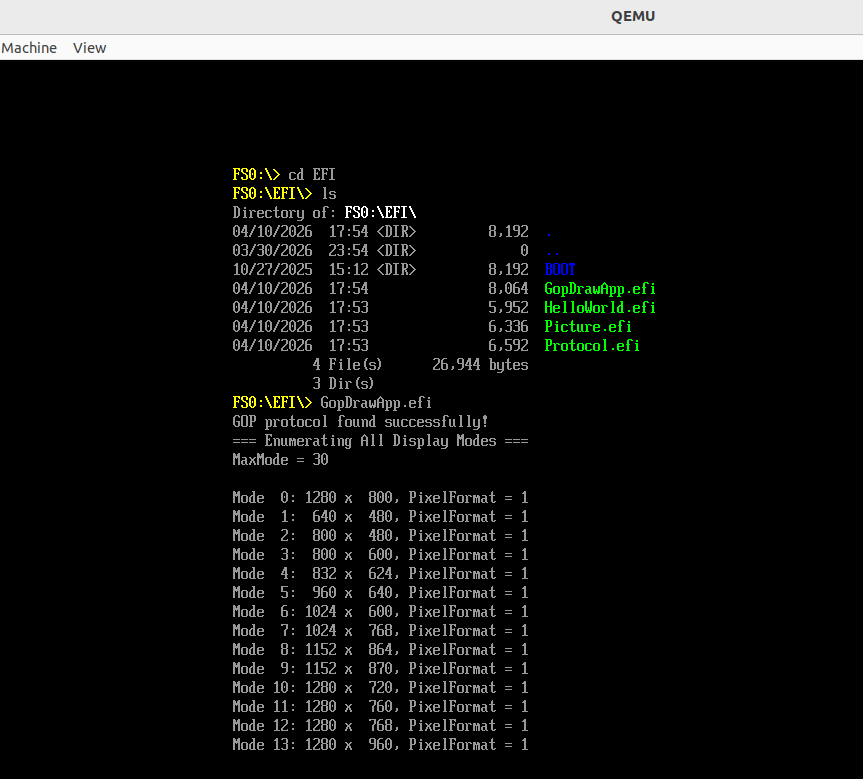
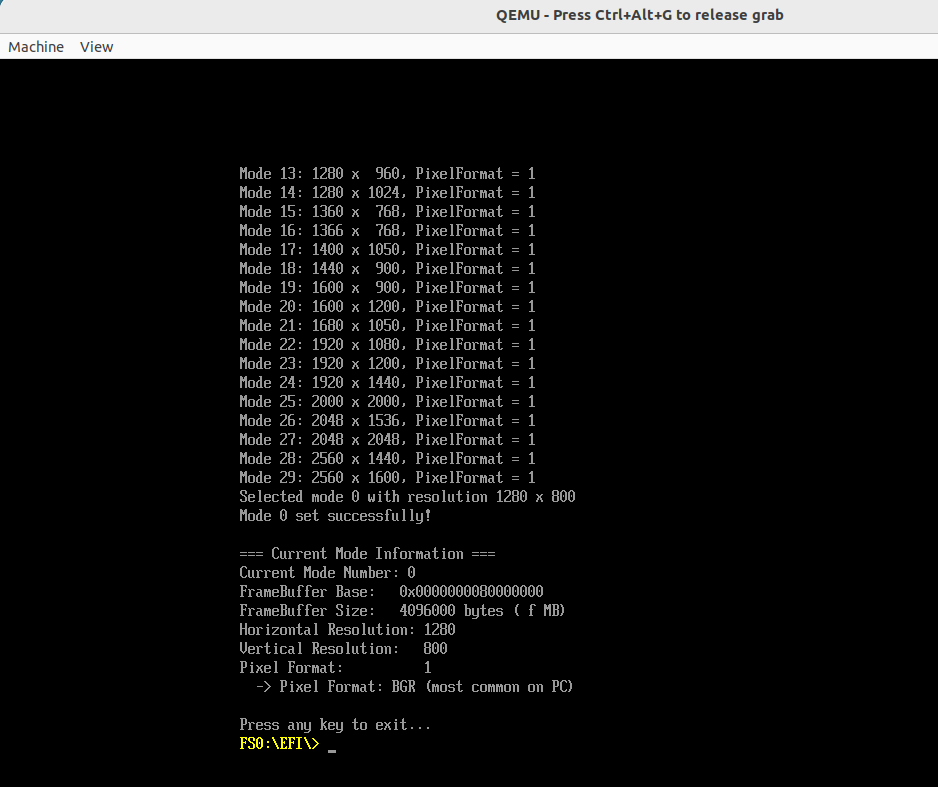
- 程序显示效果如下:
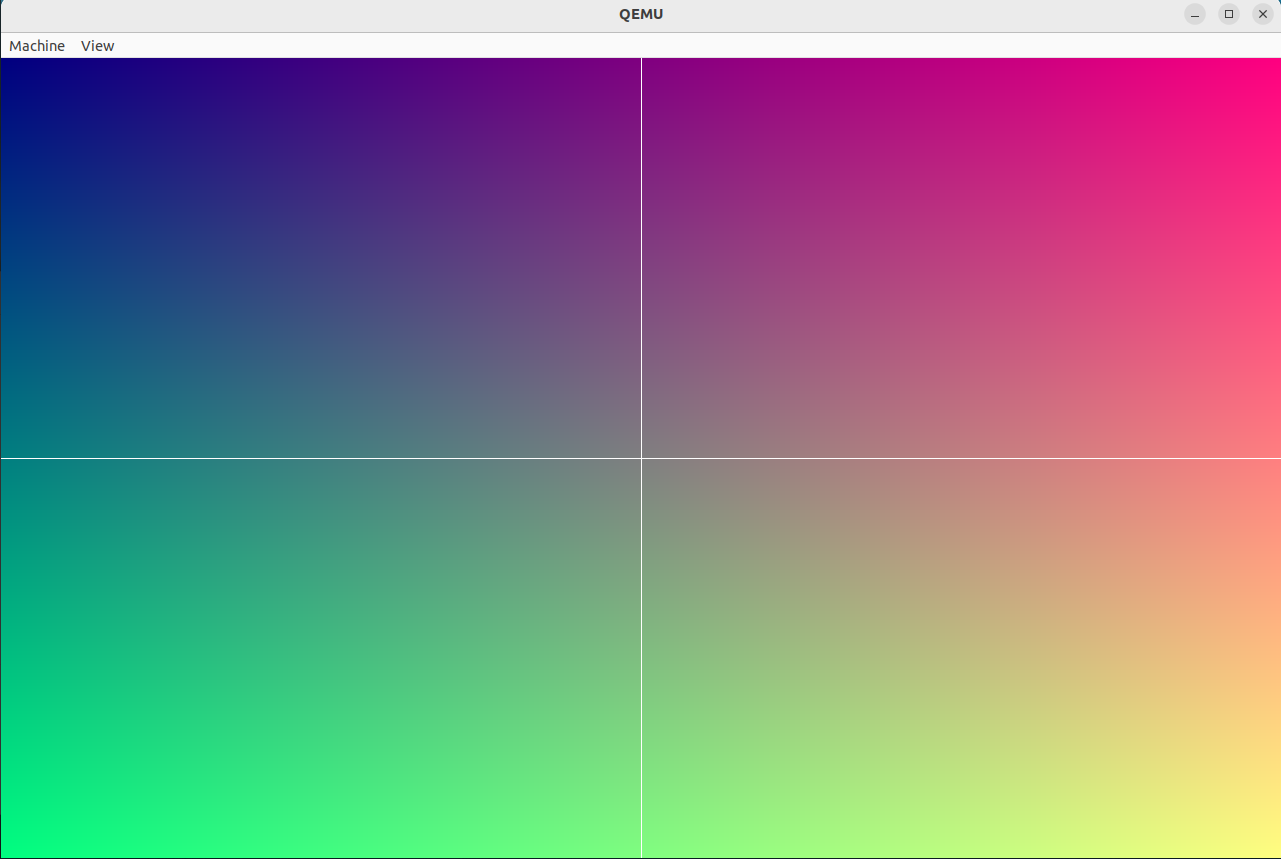
附:
- INF 文件
[Defines]
    INF_VERSION = 0x00010006
    BASE_NAME = GopDrawApp
    FILE_GUID = 4e397097-665f-4745-88c3-6305ac8623aa
    MODULE_TYPE = UEFI_APPLICATION
    VERSION_STRING = 1.0
    ENTRY_POINT = UefiMain

[Sources]
    GopDrawApp.c

[Packages]
    MdePkg/MdePkg.dec

[LibraryClasses]
    UefiApplicationEntryPoint
    UefiLib
    UefiBootServicesTableLib
- DEC 文件
[Defines]
  DEC_SPECIFICATION              = 0x00010005
  PACKAGE_NAME                   = MyPkg
  PACKAGE_GUID                   = a2ab400d-c171-43ec-a0cc-582527a93887
  PACKAGE_VERSION                = 1.0
- DSC 文件
[Defines]
    PLATFORM_NAME                  = MyPkg
    PLATFORM_GUID                  = 87654321-4321-4321-4321-CBA987654321
    PLATFORM_VERSION               = 1.0
    DSC_SPECIFICATION              = 0x00010005
    OUTPUT_DIRECTORY               = Build/MyPkg
    SUPPORTED_ARCHITECTURES        = X64
    BUILD_TARGETS                  = DEBUG|RELEASE

[LibraryClasses]
    UefiLib|MdePkg/Library/UefiLib/UefiLib.inf
    UefiApplicationEntryPoint|MdePkg/Library/UefiApplicationEntryPoint/UefiApplicationEntryPoint.inf
    PrintLib|MdePkg/Library/BasePrintLib/BasePrintLib.inf
    PcdLib|MdePkg/Library/BasePcdLibNull/BasePcdLibNull.inf
    MemoryAllocationLib|MdePkg/Library/UefiMemoryAllocationLib/UefiMemoryAllocationLib.inf
    DebugLib|MdePkg/Library/UefiDebugLibConOut/UefiDebugLibConOut.inf
    BaseMemoryLib|MdePkg/Library/BaseMemoryLib/BaseMemoryLib.inf
    BaseLib|MdePkg/Library/BaseLib/BaseLib.inf
    UefiBootServicesTableLib|MdePkg/Library/UefiBootServicesTableLib/UefiBootServicesTableLib.inf
    DevicePathLib|MdePkg/Library/UefiDevicePathLib/UefiDevicePathLib.inf
    UefiRuntimeServicesTableLib|MdePkg/Library/UefiRuntimeServicesTableLib/UefiRuntimeServicesTableLib.inf
    RegisterFilterLib|MdePkg/Library/RegisterFilterLibNull/RegisterFilterLibNull.inf
    DebugPrintErrorLevelLib|MdePkg/Library/BaseDebugPrintErrorLevelLib/BaseDebugPrintErrorLevelLib.inf

[Components]
    MyPkg/Application/GopDrawApp/GopDrawApp.inf
Steady Progress!
本文来自互联网用户投稿,该文观点仅代表作者本人,不代表本站立场。本站仅提供信息存储空间服务,不拥有所有权,不承担相关法律责任。如若内容造成侵权/违法违规/事实不符,请联系邮箱:jacktools123@163.com进行投诉反馈,一经查实,立即删除!
标签:
相关文章
最新发布
点击排行
本站推荐